New Agent Skills Standard for Your Coding Workers in GitHub Copilot
How Agent Skills fill the space between AGENTS.md and MCP: context loaded on demand, project instructions and lightweight scripts without the full protocol overhead.
How do you work with context in AI coding tools, or teach an agent to use scripts you have prepared in advance? It can be solved by prompting in AGENTS.md, but that is not a standardized approach and does not always work — the behaviour will depend heavily on the model used and will be harder to predict. For better results you can use Model Context Protocol, but that means writing a piece of software and is generally more robust and for some situations unnecessarily complex. That is why today we will focus on an option somewhere in between — Agent Skills.
Basics
AGENTS.MD is a file with instructions for the agent. In VS Code, GitHub Copilot can (depending on settings) automatically add it to the chat context, typically as "project instructions" — how the agent should behave, what standards to follow, and how to navigate your repository (where to find specs, coding standards, how the source is structured, etc.). VS Code can also (experimentally) work with AGENTS.md in subdirectories — the agent then picks the relevant instructions based on which part of the repository it is currently working in.
MCP defines tools, where the agent has a list of available tools with a short description of their purpose and expected arguments. This covers the basic editor operations in tools like VS Code (searching the codebase, reading and editing files, running local commands and scripts, creating todos, downloading web pages), but also a whole range of other tools such as access to Azure, GitHub, Kubernetes, PostgreSQL, Jira, and your own proprietary APIs and services. MCP is not only for coding agents, but also for various conversational and business agents — and in addition to running locally, it is primarily a complete protocol for operation discovery, security, and a very robust and universal solution.
Skills are something in between. Like AGENTS.md, they are just local files (typically in a specific directory in the repo — in GitHub's case that is .github/skills/skillname or .claude/skills/skillname), but the trick is that they are not loaded entirely into context. Similar to MCP, only their list and description are placed into context — nothing more. The agent thus knows what is in them, but the detailed content does not fill up the context. This is beneficial because it reduces latency, sometimes costs (with GitHub Copilot you pay in the form of Premium Requests, so you may not worry about it as much, but elsewhere it plays a big role), but most importantly it simplifies the agent's job. Too much information that is not relevant to the task at hand often reduces the overall quality of its work — there is simply too much for it to handle and it gets lost.
Note: at the time of writing, Agent Skills in VS Code are available from version 1.108 (already released) as an experimental/preview feature and need to be explicitly enabled via the chat.useAgentSkills setting.
The directory structure is prescribed. There must be a SKILL.md file with a YAML header containing a name and description, and a body where any instructions and details can go. In addition, this directory can contain other files, and their role can be described in the SKILL.md text — typically individual scripts and utilities, what they are for and how they are used, i.e. what arguments they take, and so on.
Dynamic Context Loading
Let's try out how it works with a simple example — here is my SKILL.md:
---
name: simplecontext
description: This contains information about company project code-named BigDog
---

Here are information about this project:
- Owner: Michael Coder
- Inventary number: 54321
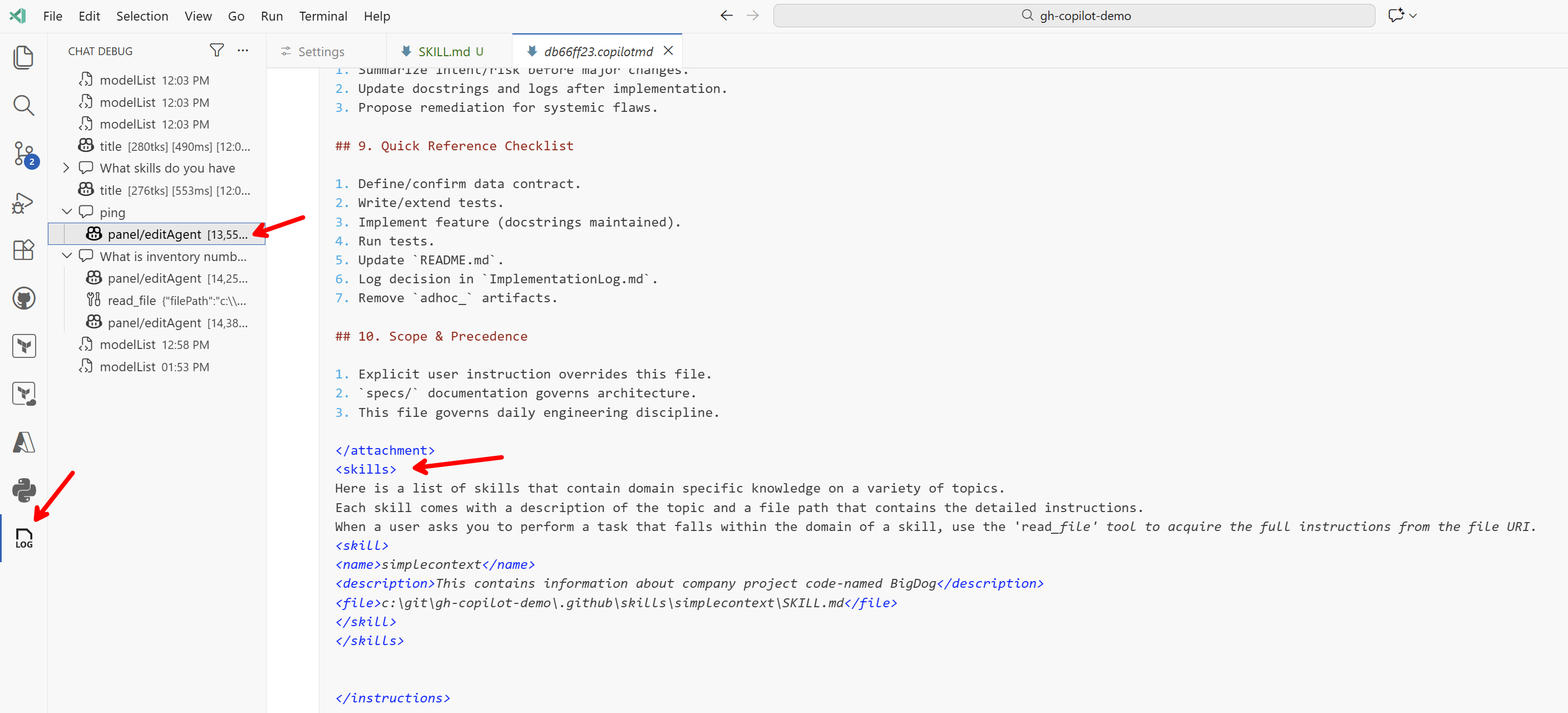
We will take advantage of VS Code's ability to display exactly what is part of the context and how everything works under the hood (Chat Debug view / log of requests to the model). First I'll type simply Ping into the chat and see what was sent to the model.
Screenshot 2026-01-06-14-01-15
First come the metadata, where a lot of space is dedicated to describing the built-in tools and MCP servers, for example:
Tool metadata excerpt
[
    {
        "function": {
            "name": "apply_patch",
            "description": "Edit text files. Do not use this tool to edit Jupyter notebooks. `apply_patch` allows you to execute a diff/patch against a text file, but the format of the diff specification is unique to this task, so pay careful attention to these instructions. To use the `apply_patch` command, you should pass a message of the following structure as \"input\":\n\n*** Begin Patch\n[YOUR_PATCH]\n*** End Patch\n\nWhere [YOUR_PATCH] is the actual content of your patch, specified in the following V4A diff format.\n\n*** [ACTION] File: [/absolute/path/to/file] -> ACTION can be one of Add, Update, or Delete.\nAn example of a message that you might pass as \"input\" to this function, in order to apply a patch, is shown below.\n\n*** Begin Patch\n*** Update File: /Users/someone/pygorithm/searching/binary_search.py\n@@class BaseClass\n@@    def search():\n-        pass\n+        raise NotImplementedError()\n\n@@class Subclass\n@@    def search():\n-        pass\n+        raise NotImplementedError()\n\n*** End Patch\nDo not use line numbers in this diff format.",
            "parameters": {
                "type": "object",
                "properties": {
                    "input": {
                        "type": "string",
                        "description": "The edit patch to apply."
                    },
                    "explanation": {
                        "type": "string",
                        "description": "A short description of what the tool call is aiming to achieve."
                    }
                },
                "required": [
                    "input",
                    "explanation"
                ]
            }
        },
        "type": "function"
    },
    {
        "function": {
            "name": "create_directory",
            "description": "Create a new directory structure in the workspace. Will recursively create all directories in the path, like mkdir -p. You do not need to use this tool before using create_file, that tool will automatically create the needed directories.",
            "parameters": {
                "type": "object",
                "properties": {
                    "dirPath": {
                        "type": "string",
                        "description": "The absolute path to the directory to create."
                    }
                },
                "required": [
                    "dirPath"
                ]
            }
        },
        "type": "function"
    }
]
Then comes the built-in system prompt, where Copilot describes the agent's role, its personality, explains how to use tools, and so on. Here is a short excerpt:
System prompt excerpt
You are an expert AI programming assistant, working with a user in the VS Code editor.
Your name is GitHub Copilot. When asked about the model you are using, state that you are using GPT-5 mini.
Follow Microsoft content policies.
Avoid content that violates copyrights.
If you are asked to generate content that is harmful, hateful, racist, sexist, lewd, or violent, only respond with "Sorry, I can't assist with that."
<coding_agent_instructions>
You are a coding agent running in VS Code. You are expected to be precise, safe, and helpful.
Your capabilities:
- Receive user prompts and other context provided by the workspace, such as files in the environment.
- Communicate with the user by streaming thinking & responses, and by making & updating plans.
- Execute a wide range of development tasks including file operations, code analysis, testing, workspace management, and external integrations.

</coding_agent_instructions>
<personality>
Your default personality and tone is concise, direct, and friendly. You communicate efficiently, always keeping the user clearly informed about ongoing actions without unnecessary detail. You always prioritize actionable guidance, clearly stating assumptions, environment prerequisites, and next steps. Unless explicitly asked, you avoid excessively verbose explanations about your work.

</personality>
<tool_preambles>
Before making tool calls, send a brief preamble to the user explaining what you're about to do. When sending preamble messages, follow these principles:
- Logically group related actions: if you're about to run several related commands, describe them together in one preamble rather than sending a separate note for each.
- Keep it concise: be no more than 1-2 sentences (8-12 words for quick updates).
- Build on prior context: if this is not your first tool call, use the preamble message to connect the dots with what's been done so far and create a sense of momentum and clarity for the user to understand your next actions.
- Keep your tone light, friendly and curious: add small touches of personality in preambles to feel collaborative and engaging.
Examples of good preambles:
- "I've explored the repo; now checking the API route definitions."
- "Next, I'll patch the config and update the related tests."
- "I'm about to scaffold the CLI commands and helper functions."
- "Config's looking tidy. Next up is patching helpers to keep things in sync."

Avoiding preambles when:
- Avoiding a preamble for every trivial read (e.g., `cat` a single file) unless it's part of a larger grouped action.
- Jumping straight into tool calls without explaining what's about to happen.
- Writing overly long or speculative preambles — focus on immediate, tangible next steps.

</tool_preambles>
<planning>
You have access to an `manage_todo_list` tool which tracks steps and progress and renders them to the user. Using the tool helps demonstrate that you've understood the task and convey how you're approaching it. Plans can help to make complex, ambiguous, or multi-phase work clearer and more collaborative for the user. A good plan should break the task into meaningful, logically ordered steps that are easy to verify as you go. Note that plans are not for padding out simple work with filler steps or stating the obvious.
Use a plan when:
- The task is non-trivial and will require multiple actions over a long time horizon.
- There are logical phases or dependencies where sequencing matters.
- The work has ambiguity that benefits from outlining high-level goals.
- You want intermediate checkpoints for feedback and validation.
- When the user asked you to do more than one thing in a single prompt
- The user has asked you to use the plan tool (aka "TODOs")
- You generate additional steps while working, and plan to do them before yielding to the user

Skip a plan when:
- The task is simple and direct.
- Breaking it down would only produce literal or trivial steps.

Planning steps are called "steps" in the tool, but really they're more like tasks or TODOs. As such they should be very concise descriptions of non-obvious work that an engineer might do like "Write the API spec", then "Update the backend", then "Implement the frontend". On the other hand, it's obvious that you'll usually have to "Explore the codebase" or "Implement the changes", so those are not worth tracking in your plan.

It may be the case that you complete all steps in your plan after a single pass of implementation. If this is the case, you can simply mark all the planned steps as completed. The content of your plan should not involve doing anything that you aren't capable of doing (i.e. don't try to test things that you can't test). Do not use plans for simple or single-step queries that you can just do or answer immediately.
There is a lot more there! Then comes the <attachment> where I see the content of my AGENTS.md (i.e. instructions added to context according to settings). And then comes the skills section:
<skills>
Here is a list of skills that contain domain specific knowledge on a variety of topics.
Each skill comes with a description of the topic and a file path that contains the detailed instructions.
When a user asks you to perform a task that falls within the domain of a skill, use the 'read_file' tool to acquire the full instructions from the file URI.
<skill>
<name>simplecontext</name>
<description>This contains information about company project code-named BigDog</description>
<file>c:\git\gh-copilot-demo\.github\skills\simplecontext\SKILL.md</file>
</skill>
</skills>
And here is the core of how it works. The context only contains the name and description, not the full instructions or other files. For the Ping query, the model did not need to use this skill's context, so it simply responded.
The body still contains other items such as folder information and user details, but then we see the simple model response.
pong — I'm here and ready. What would you like me to do next?
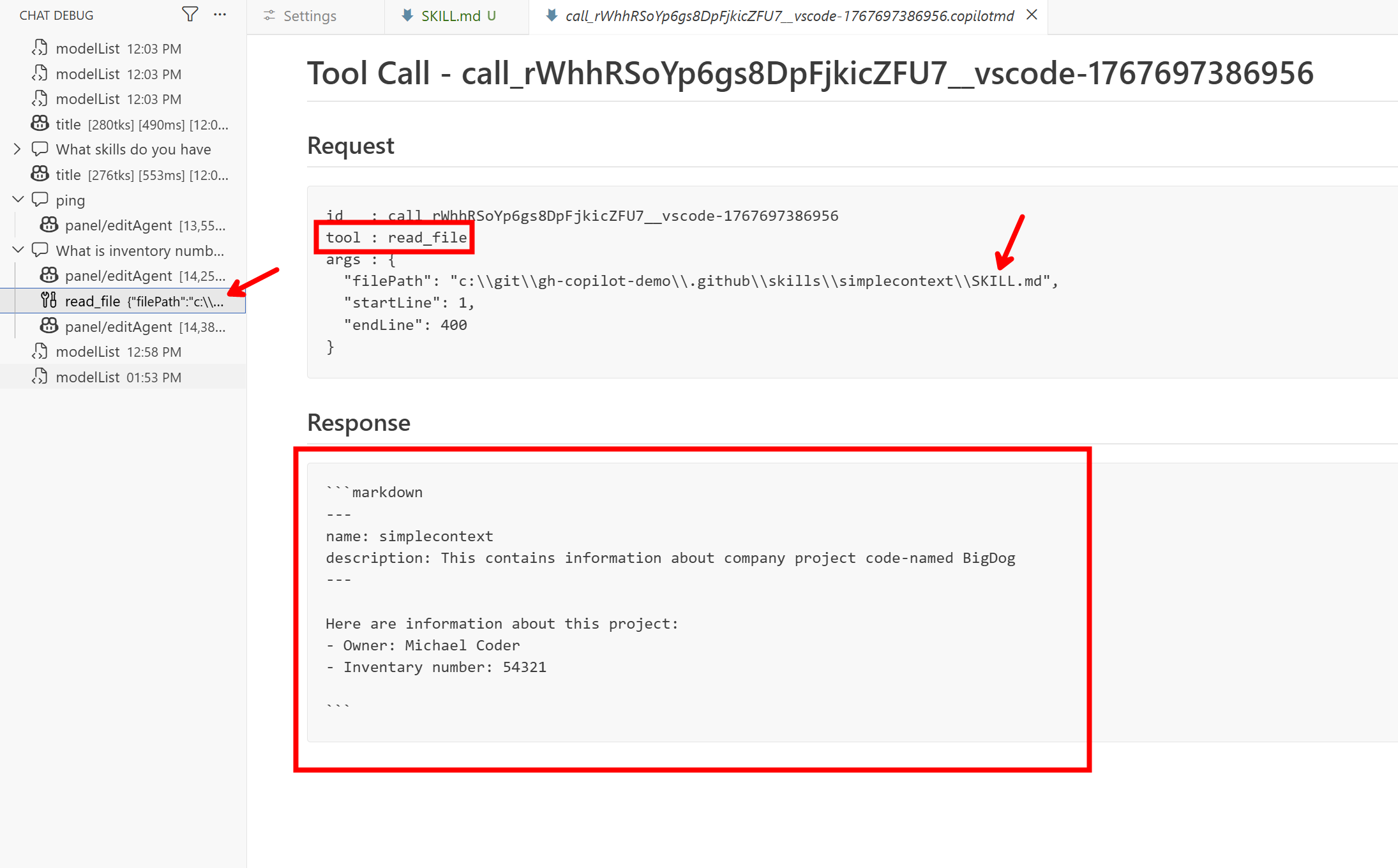
Now here it comes — I ask What is inventory number for BigDog. This information is not part of the context, it is not in the skill's name or description, but the model should understand from the description that it would be good to load the skill in order to answer my question. And that is exactly what it did.
Screenshot 2026-01-06-14-09-03
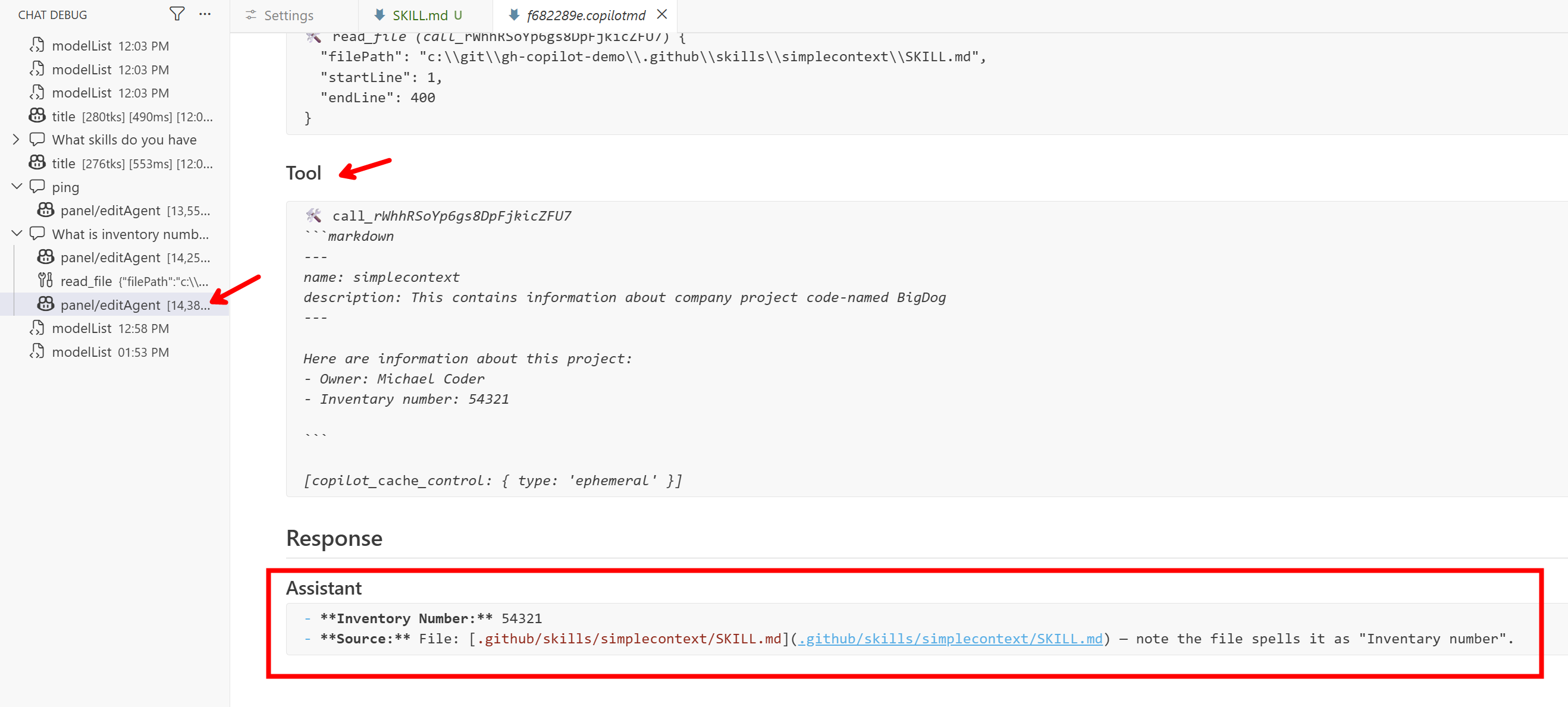
We can see that the model decided to use the file reading tool, loaded the contents of SKILL.md, and thus knows the answer.
Screenshot 2026-01-06-14-10-21
Skills as Lightweight Tools
Let's look at an example with a custom script, where we explain in the skill how to work with it. Here is my SKILL.md:
---
name: json-to-xml-converter
description: Convert JSON data to XML format with customizable root element and attribute handling
---

# JSON to XML Converter Skill

## Purpose

Convert JSON data structures into well-formed XML documents. Handles nested objects, arrays, and primitive types.

## Usage

### Command Line

~~~bash
# Basic conversion
python .github/skills/json-to-xml-converter/scripts/json2xml.py input.json output.xml

# Custom root element
python .github/skills/json-to-xml-converter/scripts/json2xml.py input.json output.xml --root "data"

# Pipe data
echo '{"name": "test"}' | python .github/skills/json-to-xml-converter/scripts/json2xml.py - -
~~~

### Parameters

- `input_file`: Path to JSON file or `-` for stdin
- `output_file`: Path to XML output file or `-` for stdout
- `--root`: Root element name (default: "root")

## Example

**Input JSON:**
~~~json
{"user": {"name": "Alice", "age": 30}, "items": [1, 2, 3]}
~~~

**Output XML:**
~~~xml
<?xml version="1.0" encoding="utf-8"?>
<root>
  <user>
    <name>Alice</name>
    <age>30</age>
  </user>
  <items>
    <item>1</item>
    <item>2</item>
    <item>3</item>
  </items>
</root>
~~~

## Agent Integration

Use `run_in_terminal` to invoke the script:

~~~bash
python .github/skills/json-to-xml-converter/scripts/json2xml.py input.json output.xml --root "mydata"
~~~

**Important Notes:**
- No external dependencies (Python stdlib only)
- JSON keys with spaces are converted to underscores
- Arrays become `<item>` elements
- Handles invalid JSON with clear error messages
And in the scripts directory, in addition to README.md and pyproject.toml, there is the actual code:
#!/usr/bin/env python3
"""
JSON to XML Converter

Converts JSON data structures to well-formed XML documents.
Handles nested objects, arrays, and primitive types.
"""

import json
import sys
import argparse
import xml.etree.ElementTree as ET
from typing import Any, Optional
from pathlib import Path


def sanitize_tag_name(name: str) -> str:
    """
    Sanitize a string to be a valid XML tag name.

    Args:
        name: The string to sanitize

    Returns:
        A valid XML tag name
    """
    # Replace spaces and invalid characters with underscores
    sanitized = name.replace(' ', '_')
    sanitized = ''.join(c if c.isalnum() or c in ('_', '-', '.') else '_' for c in sanitized)

    # Ensure it doesn't start with a digit
    if sanitized and sanitized[0].isdigit():
        sanitized = '_' + sanitized

    # Ensure it's not empty
    if not sanitized:
        sanitized = 'item'

    return sanitized


def dict_to_xml(data: Any, parent: Optional[ET.Element] = None, tag_name: str = 'item') -> ET.Element:
    """
    Convert a dictionary or other data structure to XML elements.

    Args:
        data: The data to convert (dict, list, or primitive)
        parent: The parent XML element (None for root)
        tag_name: The tag name to use for this element

    Returns:
        An XML Element
    """
    if parent is None:
        element = ET.Element(sanitize_tag_name(tag_name))
    else:
        element = ET.SubElement(parent, sanitize_tag_name(tag_name))

    if isinstance(data, dict):
        # Handle dictionary - create child elements for each key
        for key, value in data.items():
            dict_to_xml(value, element, key)
    elif isinstance(data, list):
        # Handle list - create 'item' elements for each entry
        for item in data:
            dict_to_xml(item, element, 'item')
    elif data is None:
        # Handle null values
        element.text = ''
    else:
        # Handle primitive types (str, int, float, bool)
        element.text = str(data)

    return element


def convert_json_to_xml(json_str: str, root_name: str = 'root') -> str:
    """
    Convert a JSON string to an XML string.

    Args:
        json_str: The JSON string to convert
        root_name: The name of the root XML element

    Returns:
        A formatted XML string

    Raises:
        json.JSONDecodeError: If the JSON is invalid
    """
    data = json.loads(json_str)
    root = dict_to_xml(data, tag_name=root_name)

    # Pretty print the XML
    indent_xml(root)

    # Convert to string with XML declaration
    xml_str = ET.tostring(root, encoding='utf-8', xml_declaration=True).decode('utf-8')

    return xml_str


def indent_xml(elem: ET.Element, level: int = 0) -> None:
    """
    Add indentation to XML elements for pretty printing.

    Args:
        elem: The XML element to indent
        level: The current indentation level
    """
    indent = "\n" + "  " * level
    if len(elem):
        if not elem.text or not elem.text.strip():
            elem.text = indent + "  "
        if not elem.tail or not elem.tail.strip():
            elem.tail = indent
        for child in elem:
            indent_xml(child, level + 1)
        if not child.tail or not child.tail.strip():
            child.tail = indent
    else:
        if level and (not elem.tail or not elem.tail.strip()):
            elem.tail = indent


def json_file_to_xml_file(input_path: str, output_path: str, root_name: str = 'root') -> None:
    """
    Convert a JSON file to an XML file.

    Args:
        input_path: Path to input JSON file (or '-' for stdin)
        output_path: Path to output XML file (or '-' for stdout)
        root_name: The name of the root XML element

    Raises:
        FileNotFoundError: If input file doesn't exist
        json.JSONDecodeError: If the JSON is invalid
    """
    # Read input
    if input_path == '-':
        json_str = sys.stdin.read()
    else:
        with open(input_path, 'r', encoding='utf-8') as f:
            json_str = f.read()

    # Convert
    xml_str = convert_json_to_xml(json_str, root_name)

    # Write output
    if output_path == '-':
        sys.stdout.write(xml_str)
    else:
        with open(output_path, 'w', encoding='utf-8') as f:
            f.write(xml_str)


def main() -> int:
    """
    Main entry point for the CLI.

    Returns:
        Exit code (0 for success, 1 for error)
    """
    parser = argparse.ArgumentParser(
        description='Convert JSON files to XML format',
        formatter_class=argparse.RawDescriptionHelpFormatter,
        epilog="""
Examples:
  %(prog)s input.json output.xml
  %(prog)s input.json output.xml --root data
  echo '{"name": "test"}' | %(prog)s - -
  %(prog)s - - < input.json > output.xml
        """
    )

    parser.add_argument(
        'input',
        help='Input JSON file (use "-" for stdin)'
    )
    parser.add_argument(
        'output',
        help='Output XML file (use "-" for stdout)'
    )
    parser.add_argument(
        '--root',
        default='root',
        help='Name of the root XML element (default: root)'
    )
    parser.add_argument(
        '--version',
        action='version',
        version='%(prog)s 1.0.0'
    )

    args = parser.parse_args()

    try:
        json_file_to_xml_file(args.input, args.output, args.root)

        # Print success message if not using stdout
        if args.output != '-':
            print(f"✓ Successfully converted {args.input} to {args.output}", file=sys.stderr)

        return 0

    except FileNotFoundError as e:
        print(f"Error: Input file not found: {e}", file=sys.stderr)
        return 1
    except json.JSONDecodeError as e:
        print(f"Error: Invalid JSON: {e}", file=sys.stderr)
        return 1
    except Exception as e:
        print(f"Error: {e}", file=sys.stderr)
        return 1


if __name__ == '__main__':
    sys.exit(main())
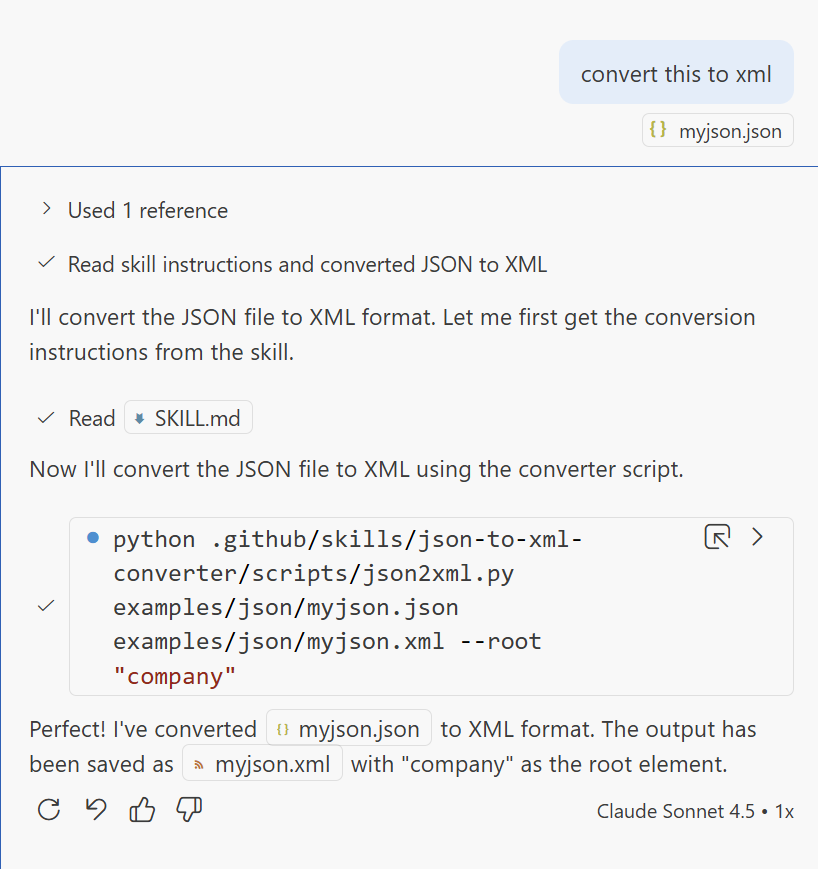
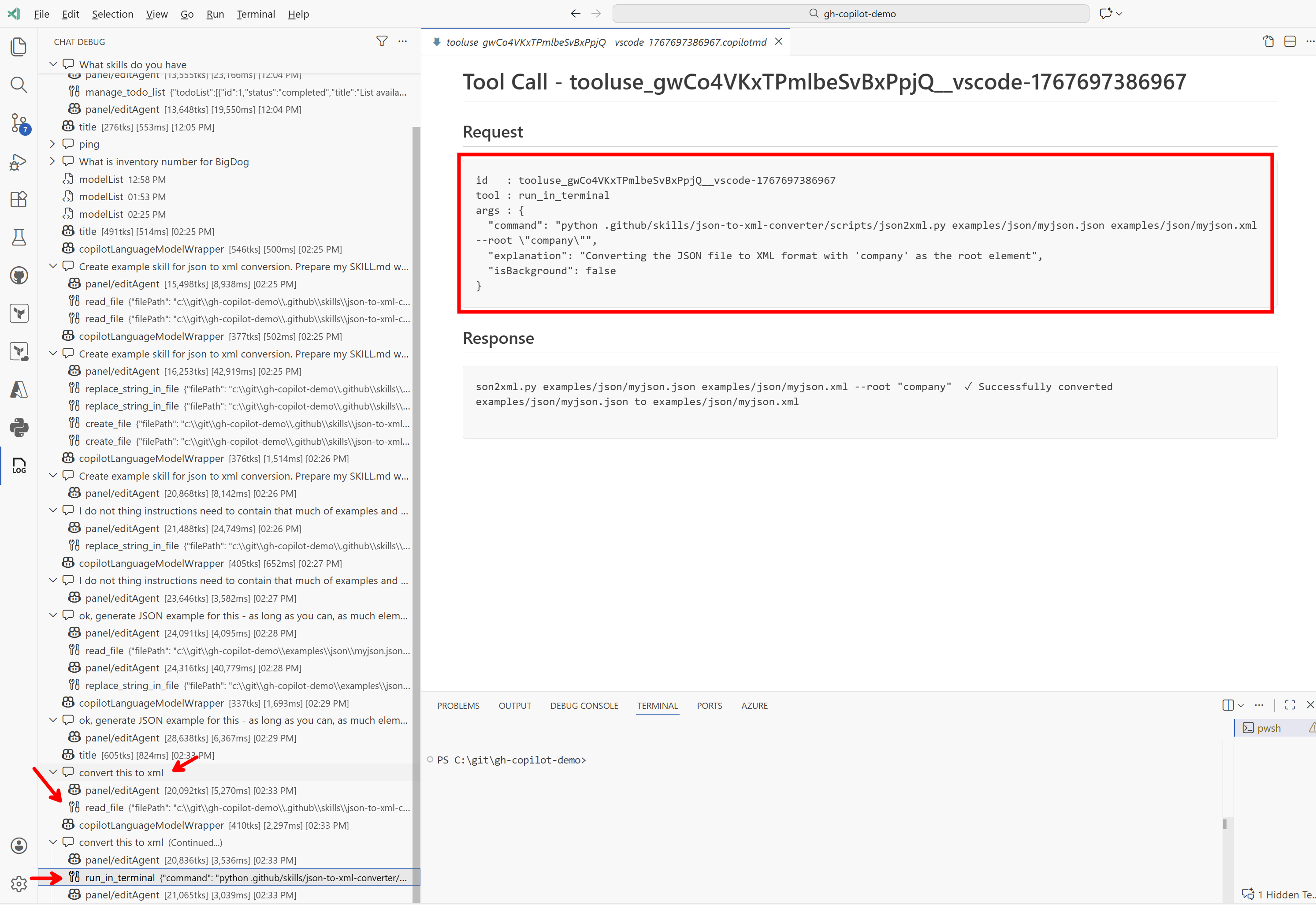
We can now simply use this skill. I took a JSON file, added it to the chat context, and said convert this to xml. The agent correctly determined that it would be good to use this skill for that, loaded the instructions from it, and ran the script. Excellent result!
In my view, Agent Skills are not something shockingly new — a similar result could be achieved with a regular AGENTS.md, but you would have to maintain the list of skills yourself, store them somewhere, which is extra work and above all risks inconsistency and difficult portability between projects. Skills standardize this, and I expect it will become a standard part of fine-tuning individual models — I assume that since Anthropic came up with it, it is already baked into Claude models, and you can definitely expect the same from OpenAI CODEX and Google too. Not only will it be standardized, but LLMs will be specifically trained on it, and so it will work much more reliably too.
Skills solve two things — elegant context loading only when it is truly needed, and the ability to create lightweight tools in the form of scripts without the full MCP layer and all the associated concerns (where it will run, how it will be secured, where the catalog will be). An excellent option for in-project helpers.
AGENTS.md
simple instructions, but often loaded too broadly.
MCP
robust protocol for tools, discovery and security, but requires software.
Skills
standardized bundle of instructions and scripts loaded on demand.
Practical benefit
less noise in context and an easier path to in-project helpers.
For in-project helpers, Agent Skills are in my view an excellent middle ground between a plain prompt and full-blown MCP.