How I built a digital coworker on Azure that learns on the job
For two months, my junior project manager will keep an eye on changes to the project. I’ll walk them through the first one. Next time, I want them to work out who’s affected and whether to get in touch.
Suppose we’re launching a product and a junior project manager joins my team for the next two months. On day one I show them the plan, where we record approved changes and who hands what over to whom. “When something shifts, I want to know who needs to do something differently. You can contact that person. You can suggest a new deadline, but only the person responsible for it can confirm it.” That’s how I want to bring a digital coworker on board, too. It starts from a role description, gets its own identity and can turn the way we work on this project into a skill on its own. I don’t want to teach it all over again in every prompt.
Say the junior alerts the whole team about the first change. I correct it: “The copywriter needs to know when a promised feature changes, not every time we move an internal meeting.” Three weeks later, on a routine check, it compares the approved scope with the website draft. A feature has been dropped, but the page still promises it. Now it makes sense to message the copywriter in Teams: “This feature is no longer in the release plan, but it’s still in the web copy. Here are both sources.” Nobody just mentioned the junior, and I didn’t have to explain again why this matters.
For “summarize the plan for me every Thursday,” a scheduled prompt in Copilot will do. In autopilots-on-azure I’m trying something different: give an agent a job and be able to teach it how to do that job. Let’s look at what I built for that coworker.
Who did I actually give the job to?
Take a task that a teammate is about to take over. There are four ways I could handle it. These aren’t four generations of technology, each making the previous one obsolete.
Who gets the job
What I get for the same task
What’s still my job
A chatbot
It reads the notes and tells me which handoff has no owner.
Acting on the answer and remembering to ask again.
A workflow
When the status changes, it notifies the people on a predefined list.
Setting the rule and changing it when the wrong people get notified.
My personal assistant
At my request it checks the material, prepares a table, perhaps even edits the document on my behalf if authorized.
I usually direct the next task. It’s still my work and my context.
A digital worker
Throughout the project it follows the sources we agreed on. It applies my earlier correction, works out who needs to change what they’re doing and contacts that person within its remit.
Teaching it the job, setting its authority and checking whether its judgment and learned procedure hold up.
For me the test comes the second time something similar happens: do I have to explain it again, or does the junior change its approach based on my last correction? It’s not about counting tool calls or having a chat window. What matters is who owns the job between interactions, who learns from experience and whose identity is used to act. The categories can overlap.
If I want a managed service in Microsoft 365, there’s Microsoft Autopilot, rolling out in Frontier preview since November 17, 2026. Microsoft runs the agent’s environment for me.
For the demo I took the open-source route. I want to decide where the runtime lives, what it can reach on my network and which tools it gets. I run it in Azure with models from Foundry, but I don’t have to. I can take the core, role and skills elsewhere, connect my own model and replace the Azure services with equivalents.
How the coworker gets work and learns the job
Hermes Agent is an open-source harness: it manages the agent’s session, calls the chosen model, executes its tool calls and gives it a working directory, memory and skills. I chose it mainly because it can turn experience into a procedure it can use next time. I don’t have to write that learning loop myself. This is the part of the junior that runs inside its sandbox.
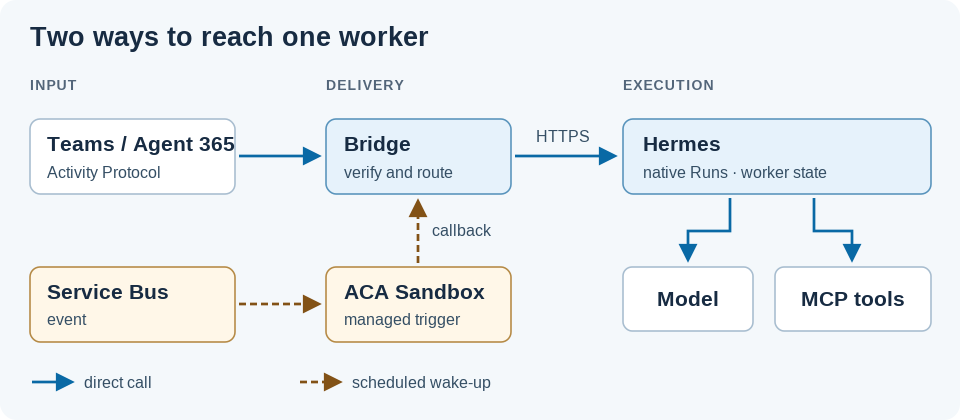
Teams still needs to reach an endpoint from outside, even when the junior is asleep. So in front of Hermes I put a bridge, also called the gateway. It contains no model or other AI component. It authenticates the caller, reads the message, reaction or click using the Activity Protocol and knows where to deliver the reply. Unlike Hermes it doesn’t need access to the project documents on the worker’s disk to do that. Teams and Microsoft 365 Copilot speak the same protocol.
Two ways in: Teams calls the bridge directly over HTTPS. Asynchronous events, such as a scheduled job coming due, arrive from Service Bus through a managed trigger in ACA Sandboxes. Neither model nor MCP calls go through the bridge.
A request to its OnDemand port wakes the bridge. Over authenticated HTTPS it calls the native Hermes /v1/runs, waking the runtime too. The bridge has no access to the model or the MCP tools. Hermes calls Foundry using the runtime’s managed identity. For some MCP tools I still handle the connection inside the runtime; the goal is to configure it in ACA Sandboxes, outside the container, so Hermes only has to use the tool. The bridge sends the result back to the original conversation through the Agents SDK. In Teams I’m waiting for the answer, not for a connector’s next poll to pick up my question.
The bridge and Hermes can suspend independently. They can also live on different networks: put the incoming bridge in a DMZ, for example, and the runtime in a VNet with private DNS and a route to an internal MCP server. The demo has a private incident service and a public shipment service. If I connect my network to on-prem over VPN or ExpressRoute, I can use the same pattern for a tool in my own datacenter.
Their lifecycles are separate, too. A change to card delivery doesn’t require a change to the junior’s role, and upgrading Hermes doesn’t mean creating a new coworker in Teams. One bridge could, in principle, route traffic to several agents. In the demo, each worker has its own bridge. That way I don’t have to trust a shared router to decide whose identity may open whose workspace.
There’s no extra app to open. The junior has its own Agent User in Microsoft Agent 365. When I’m teaching it, I use a 1:1 chat. When the team is working out who picks up the work next, I can mention @Hermes in a team channel and it replies in the original thread, where everyone else can see the answer. I don’t always have to go first, either: it can use its Teams tool to contact a specific person under its own identity. That’s how I’d handle the note to the copywriter.
How do I know it heard me? On an eligible group request the bridge immediately adds 👀: “I’ve picked this up.” It doesn’t have to wait for Hermes to wake or for model output. It removes the eyes on completion or failure; in personal and group chats it can also show typing. Then there’s another kind of reaction: Hermes itself can choose 👍 to agree, ❤️ in response to praise or 😮 at unexpected news. It picks from the supported reactions based on what the message means; the bridge applies that choice. And sometimes NO_RESPONSE is best: let the team carry on.
The identity works beyond chat. If I mention the agent in a document comment, the reply belongs in the comment thread. An email should get one email reply, not one from Hermes and another courtesy of the bridge in Teams. Separating the meaning of a response from its delivery in a particular channel already pays off here.
I can create two juniors from the same role in Git. They start with the same skills, but each has its own history and /data/hermes home. When I correct one junior, I want that junior to remember. Whether I’ve found a better way for everybody to work is a different decision.
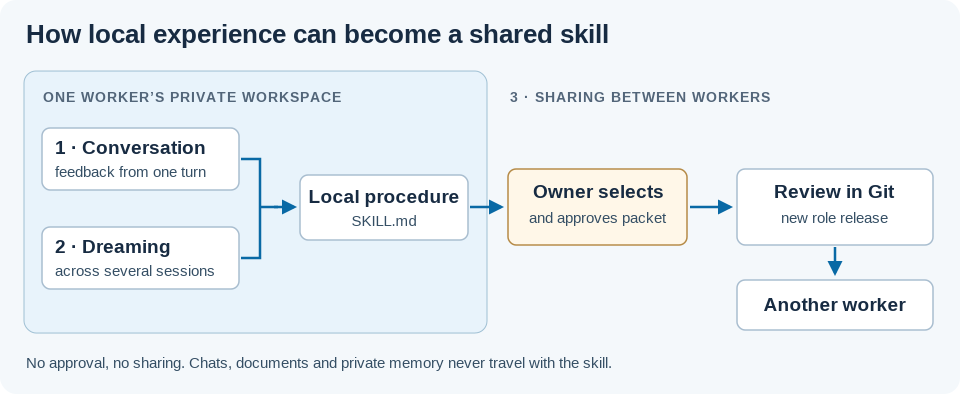
A conversation or a Dream can change one junior’s procedure. Only a selected skill reaches another worker, after owner approval, Git review and a new role release.
1. One conversation: the junior corrects its procedure
“Show deadlines in Prague time on this project” is a preference for memory. “When reviewing web copy, compare promised features with the approved plan and only contact the writer if the change affects the text” is a procedure for a project skill. Hermes supports both natively. During a turn or in a background review afterwards, it can update memory or write SKILL.md with skill_manage. I can also teach it a procedure explicitly with /learn. If I start a new chat with /new, it doesn’t need the old conversation: it loads the relevant skill when needed. You can try the memory/skill distinction in the demo. What changes is the working procedure, not the model weights.
2. Several conversations: what Dreaming is for
In one chat it wasn’t clear who would take over a task. In another we copied a deadline from meeting notes that nobody had confirmed. Seen together, they suggest adding one question to the review: “Who confirmed they’ll take this, and by when?” That’s why I added a scheduled system.dream job. Service Bus wakes it; a fresh Hermes session runs my dream-reflection role skill. It reviews several recent sessions and their outcomes, compares them with existing skills and decides whether anything is missing. Scheduling and directing that reflection are my integration; history, memory and the skill-writing tools come from Hermes. A Dream can legitimately store nothing and never sends its findings to other workers by itself.
3. Several juniors: what may leave in a Learning Packet
Checking for a confirmed recipient might help other teams. Who to contact about the copy on our site is our business. So between local learning and the shared role I put a Learning Packet and a human review. The owner opens /learning in a personal chat, inspects the diff, and can undo a change, keep it private or mark it for sharing. Only an approved, signed packet passes the exact version of a generalized skill on for review. It contains no original chats, working files or personal memory. If the change passes review in Git, other juniors pick it up when refreshed to the new role release. The signature proves where the change came from, not that it’s good.
A two-month role doesn’t need two months of running compute
Tokens are easy to count. But besides the model, my junior needs a computer of its own. That’s where it reads documents, runs tools and edits its skills. For isolation, I don’t want a thousand juniors sharing a process full of private working directories. I don’t want to pay for a thousand running computers overnight when none has work, either. With ACA Sandboxes, each keeps its workspace. I can hibernate its machine between jobs and pay no CPU or RAM charges while the sandbox is stopped.
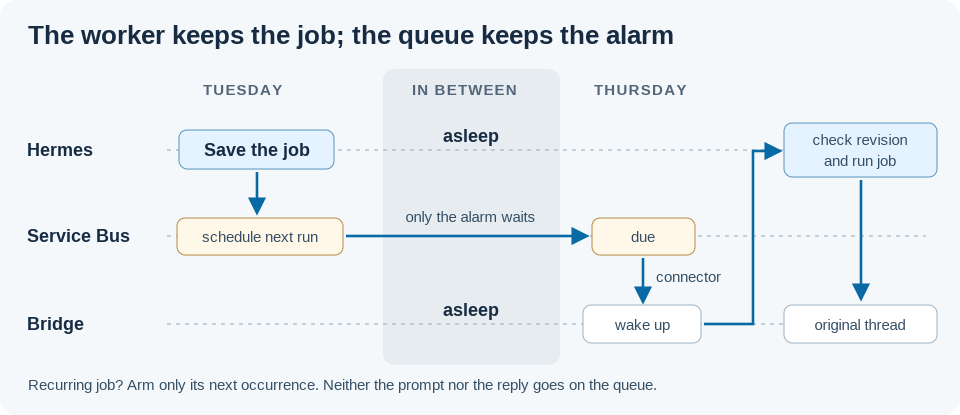
Now consider the work scheduled for Thursday. The junior has to check who is taking over each task and by when, and put the result in the same thread. But a timer inside a suspended process won’t ring. I don’t want a new cloud job for every “get back to me in a week,” either. So I didn’t move all of cron out of Hermes: Hermes knows what to do and when; Service Bus makes sure someone rings the bell.
Hermes saves the task and schedules only its next occurrence. It sleeps until a connector wakes it through the bridge; the result goes back to the original thread.
Native cron keeps the job in the worker’s home. The bridge binds the session to an authenticated conversation up front, so the model never has to guess the recipient. My CronScheduler provider puts one scheduled message for the next occurrence on this worker’s queue. It carries the type, worker and job identifiers, revision and due time. No prompt, attachment, result or token. The user can change or cancel the job; even if the old alarm races with cancellation, its revision no longer matches.
When the message becomes due, a managed connector outside both sleeping processes picks it up and calls a separate authenticated OnDemand endpoint on the bridge. The message is locked (PeekLock), not deleted. The bridge renews the lock, the worker checks the occurrence and does the work, and the saved conversation binding gets the result home. Durable execution and delivery receipts tell a redelivered job where it can safely resume. Only successfully handled work is settled; a recurring job arms its next occurrence. Connector polling can delay a wake-up, so I wouldn’t use this as the clock on a production line.
That’s my common trigger for asynchronous integrations: user cron, overnight reflection and another attempt to publish a locked document. The last one is a plain state machine. No point buying another inference to ask “can I write yet?” I could use the same pattern for a database change or a webhook announcing a new GitHub issue or Azure DevOps work item. Those integrations aren’t in the demo: for each one I’d add an adapter that sends a message with a type field to Service Bus, and a handler for that event type on the receiving end. Interactive chat stays off the queue. An unknown external effect belongs in a dead-letter queue for inspection, not an endless retry loop. Scheduling and failure decisions
Each worker gets an isolated microVM of its own, not just another directory next to another worker’s. Its processes, memory and disk are inside; network traffic goes through platform proxies outside that boundary. That lets me answer two questions independently: how quickly can I suspend and wake the junior’s machine, and what may leave it? First, the wake-up.
“It runs in a container” doesn’t tell me what I’ll pay between messages or how long I’ll wait when one arrives. In my setup a fresh Hermes process loads Python and plugins, then discovers eleven MCP servers. In a Sweden Central measurement on 2 vCPU and 2 GiB, the virtual machine resumed in under a second. But from Disk to a ready Hermes API took 17–25 seconds; from Memory, 1.5–2.7 seconds. That’s not model response time. That’s how long it takes before I can even ask.
That’s why I use Azure Container Apps Sandboxes with OnDemand ports and hibernate each sandbox after five idle minutes. That applies to the gateway, runtime and both demo MCP servers. The documentation distinguishes two modes: Disk preserves only the disk, so Hermes reloads its plugins and discovers the MCP servers again on startup. Memory takes a snapshot of both disk and RAM, then the sandbox stops. On resume, the same process picks up where it left off.
What if Hermes works for twenty minutes without another Teams message? Outbound model calls and local CPU activity don’t reset the five-minute idle timer. My Hermes keepalive tracks when a model or tool call is actually running. While a call is active, it sends GET /health roughly once a minute to its own address through the sandbox’s HTTPS ingress. The platform sees an incoming request; it wouldn’t see a call to localhost. Once the last operation finishes, the requests stop and the sandbox can hibernate again. A single operation gets at most 30 minutes of keepalive, so a stuck call won’t keep the machine up all night.
Scale to zero here refers to idle CPU and RAM, not the entire bill. Storage, Service Bus, registry and monitoring don’t vanish.
Resuming the same process isn’t a backup. Hermes keeps local SQLite state with one writer; I didn’t put a live database on a Blob mount. When the home changes, the wrapper takes a consistent native backup roughly once a minute and publishes the finished archive to a Blob volume. A replacement runtime with an empty home restores the latest valid archive for that worker. For a planned replacement I take one final backup; after a failure the last changes might be missing. The bridge journal gets a checkpoint of its own. This separates the lifetime of the process, working state and identity. Deleting the entire Sandbox Group still deletes its volume.
“Read the internal incident status and look up the shipments from the public endpoint.” This little job separates three things nicely. Network: the incidents MCP is private, the shipments MCP uses public HTTPS. Identity: both authorize the worker, not whoever last mentioned it. Model: Foundry inference uses the runtime’s managed identity. A public address doesn’t make the data public, and private DNS isn’t permission.
For custom MCP servers the managed identity federates through the blueprint to the Agent Identity. For Microsoft 365 work I need something else: a delegated token for the fixed Agent User, for example to work on its documents. I’m not forwarding my personal token. Today a loopback adapter in the runtime obtains and refreshes those tokens; the gateway isn’t on the path from Hermes to MCP. Why still do that myself? An app-only managed identity token doesn’t represent that user, and a human-owned connection isn’t the identity of an autonomous junior. The identity decision record explains the alternatives I ruled out.
My target is to put secret management, MCP authentication and outbound policy enforcement entirely outside Hermes. Give the worker the ability to call a particular tool, not the tool’s long-lived key. Sandboxes offer egress rules, allowlists and header injection from secrets or managed identity. I already use a platform connector for Service Bus wake-up. That doesn’t mean all MCP identities live in connectors today, or that the current runtime handles nothing sensitive. One place I do enforce deny-by-default egress is generated applications. For the next integration, my first question would be “whose permissions will the tool see?” rather than “where do I put the API key?”
What the junior leaves behind for the team
For a one-off report on who’s working on what next, an attachment might be enough. In the optional generated-file mode, Hermes creates an actual DOCX or UTF-8 TXT in a directory reserved for that run. The runtime seals the file and returns its identifier, size and hash. The bridge checks scope and contents and hands the bytes to the connector. None of this “done, download /tmp/report.docx” from somebody else’s container. The output is short-lived, with at most three files of 10 MiB each. In the other direction the worker can process incoming DOCX/TXT files in a private turn without learning from the attachments. File handoff contract
But if I say “change the date in the original shared Word document,” sending me a new file hasn’t done the job. I’d lose the thread of links, comments and version history. I use Work IQ MCP for discovery and collaboration, and Graph under the Agent User for controlled reads and writes to the original item. The worker downloads it privately, finds the right paragraph by its content, makes the edit, checks both its meaning and the Open XML structure, and attempts publication with the source ETag. Did you change the document in the meantime? My older version won’t overwrite yours. The edit can be reapplied to the current text only if its target still matches.
If the document is locked, a card offers two honest choices: keep trying the original, or send an explicitly shared copy now. The first uses deterministic retries over Service Bus. If it still can’t publish within 24 hours, or the edit can no longer be reapplied safely, it too delivers a copy, clearly labeled as such. Publication and conflict handling
I use an Adaptive Card when a click has a real consequence. “Keep trying the original” has a precise effect. The model can supply readable content, not invent an operation ID and the callback that approves it. The bridge builds a known action, checks the person, conversation and expiry, and won’t perform the operation twice on a double-click. An informational card, on the other hand, can have more freedom in its layout.
An HTML widget is what I’d want for “show me what changes if we move the date.” I want to try it on the spot, without a new inference for every adjustment. I added a teams-html-widget skill to Hermes: it generates HTML, CSS and JavaScript, and the bridge adds the host handshake and size reporting. It’s sent as an extendedmarkdown message with an html-widget block, not an attachment or a public website. Calculation and filtering run inside an isolated iframe without open network access. Only an explicit selection can go back to the original session through autopilot.widget.submit. That capability lasts 30 minutes and allows one continuation; it isn’t authority to make a purchase or call an arbitrary tool.
Here’s a less dry example than a task list. In a real 1:1 Teams chat in Chrome, Hermes generated a trip planner. Choosing four people, a budget of CZK 5,000 and the culture option recalculated the cost to CZK 3,100 right in the widget. After the selection was submitted, Hermes replied in the same chat: CZK 775 per person, CZK 1,900 left. The button did more than animate. I’ve verified this in a personal chat in the web client, not on mobile, desktop or in a channel.
Suppose the copywriter no longer wants to dig a message out of chat. They want to open a list of changes whenever they like, filter it to the ones that affect the website and send the same link to a colleague. That’s no longer a widget for one conversation. I need an app with its own address and a decision about who may open it. I’ve tried two approaches.
My own container: the agent doesn’t write the login
In the implementation in the repo, Hermes writes and tests the code. The gateway deploys the app to a separate child Sandbox, not the one holding the junior’s working files. It configures Entra sign-in and the allowed participants at ingress. When a colleague opens the URL, the platform checks their identity on the OnDemand port before the request reaches the app’s code. I don’t have to trust the junior to get login right in every app it generates. That doesn’t remove the need to authorize access to individual data.
The browser talks directly to the app, not to the model. Outbound network access is denied by default. After five idle minutes the app suspends; by default it’s deleted 24 hours after suspension. The owner can extend its life or delete it from a card with no further inference. I could run the same site on my own Kubernetes cluster. I’d have to arrange equivalent isolation, sign-in ahead of the app and lifecycle management myself.
Copilot Managed Runtime: an internal Microsoft 365 app
For an internal single-page app, I can instead publish my own web build to Copilot Managed Runtime. Microsoft Copilot Code doesn’t have to write it: Hermes can write it and publish it through the SDK. The managed host handles Entra sign-in, app loading and tenant rules for connectors and sharing. An administrator can see the app in the Microsoft 365 inventory. I separately tested publishing and sharing a custom app in my tenant.
For me, the choice depends on the app. For an internal site using approved M365 connectors, I’m happy to let Microsoft run it. If I need my own server process, private networking or the option to run the code elsewhere, I’d pick the container. Either way, I still have to decide who gets access and who’ll maintain the app if it outlives the project.
Try it yourself
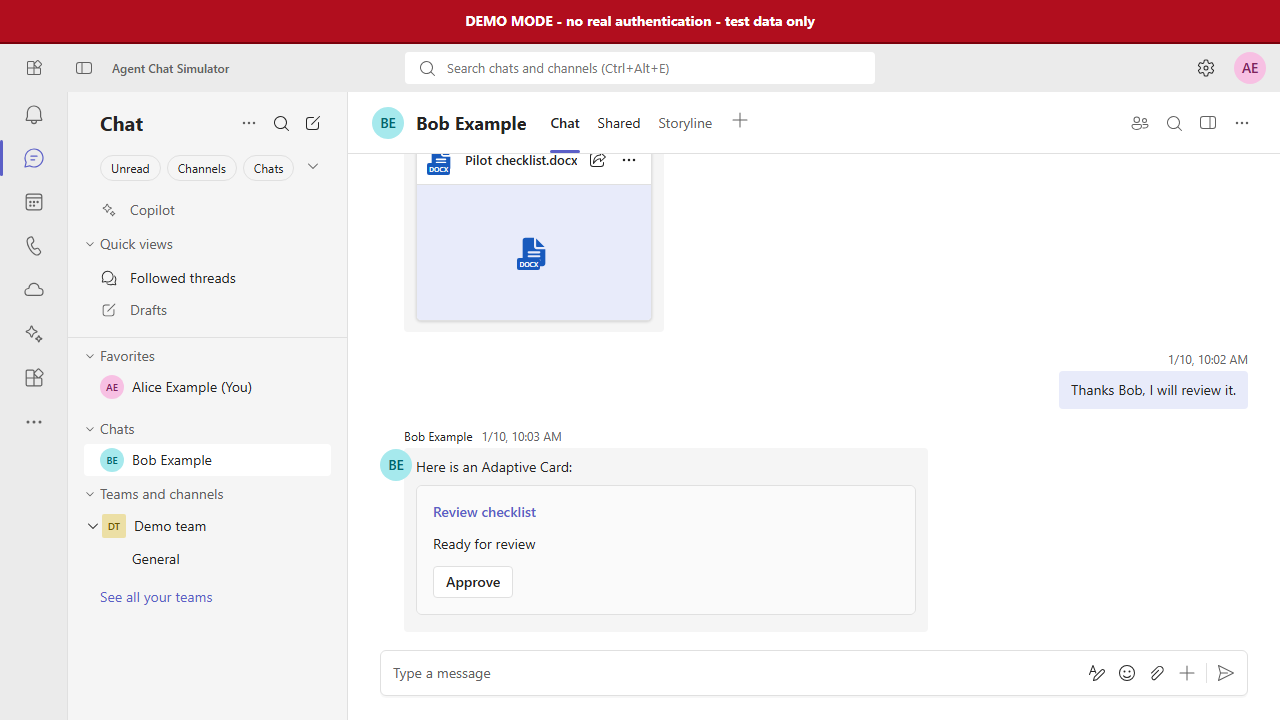
“If I click the card, does the reply land in the right thread?” I don’t want my first step towards answering that to be a request to change the tenant configuration. So I built an Agent Chat Simulator. It’s not a Microsoft client or a way into your company’s Teams. It’s my own web app that plays the part of the Teams channel in a test. It sends an Activity Protocol message to the bridge and accepts the reply through the Connector API. I’m simulating the channel, not the junior’s intelligence: if I want Hermes to answer, I have to connect its actual endpoint.
Agent Chat Simulator in DEMO mode: Alice and Bob share a test Word file and a card with an Approve button. This is the simulator, not a screenshot of Teams.
Without tenant admin access, I’d start locally. The chat-simulator directory has instructions for running it. Instead of the default Entra sign-in, I explicitly enable time-limited DEMO mode. I set my own access code, an expiry no more than 30 days ahead and the test-data-only acknowledgement. The code doesn’t authenticate people: anyone who knows it can choose any display name. I only use fictional people and test files. To connect a worker, I register its bridge’s /api/messages endpoint with the simulator and configure both ends with the same key for that demo channel. Starting the UI alone doesn’t give me a model or an agent.
My first test would have two steps: message the agent in a 1:1, then mention it in a team thread. Does the answer land where it belongs? What happens when I click a button on its card? I can also debug reactions, attachments and HTML widgets this way without publishing a package to Microsoft 365. What this doesn’t prove: whether my tenant will grant production identity and permissions, how the real Teams client behaves, or whether I can update a document through Graph or Work IQ. Those need the actual services. The deployment with a real Hermes worker on Azure still needs my own cloud environment and model, but it doesn’t require Agent 365 or publication to Teams.
For me, the test of a digital coworker comes the next time something changes on the project: it uses what I taught it last time and gets in touch with the person who needs to act on that change.